Fog of War
Jump to navigation
Jump to search
Fog of War is a darker, fog-like layer that hides everything but the terrain and buildings. It disappears as player approach the fog, depending on their range of sight.
How to Set It Up
- Open FO2238Config.exe
- Set a binding, if you don't have the Toggle Fog option run updater again.
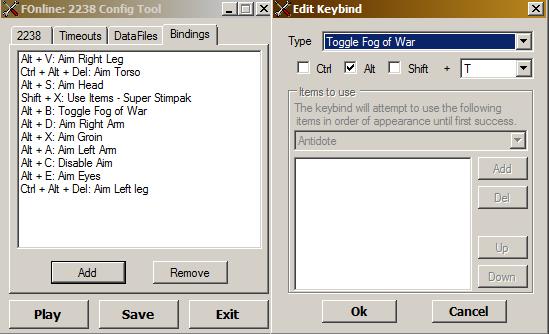
- Open FOnline2238.cfg with notepad
- Add line you see in the pic (no spaces around the = ), you can use different values (0 0 0 64 gives transparent black)
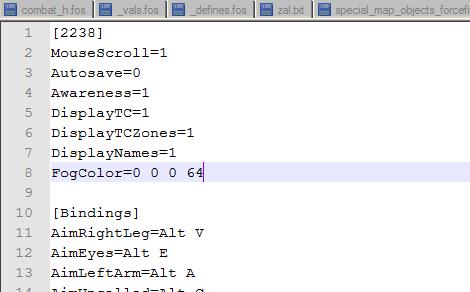
- To enable Fog of War by default (without using the keybinding everytime), set the variable Fog=1 after the line [2238] in FOnline2238.cfg


How it looks like

| See Also | ||
|---|---|---|
| Character | SPECIAL · Traits · Perks · Skills · Skill points · Carry Weight · Levels · Armor Class · Reputation · Skins · NPC Factions · Player-Driven Factions · Reroll · Vault-Tec DB | |
| Combat | Hit Chance · Critical Chance · Critical Hit · Aimed Attack · Resistances · Hit Points · Death · Miss · Critical Miss · Range · Sight · Fog of War · Shooting | |
| Items | Weapons · Armors · Ammo · Resources · Blueprints · Craftables · Books · Drugs · Implants · Miscellaneous Items | |
| And Other | Guides · Quests · Jobs · Telltales · Caravans · Caravan cart · Dungeons · Player Farm · Commands · Abbreviations · Merchants · Town Control · Vehicles · Tents · Safe Houses · Bases · Group Encounters · Special Encounters | |